
Vibe-coding a startup MVP
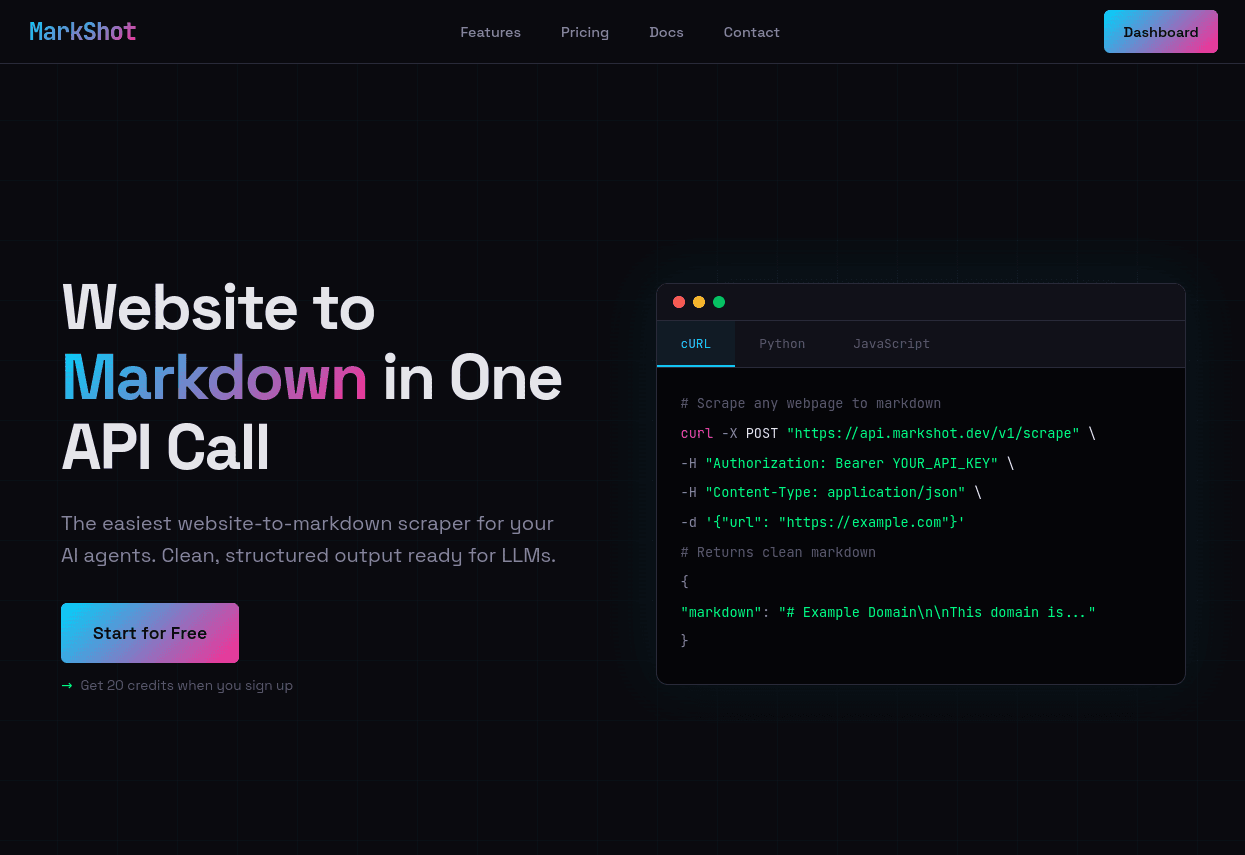
AI coding tools promise faster delivery and lower development overhead but raise practical questions around security, maintainability, and long-term viability. To understand their limits in greenfield work, I built a complete SaaS (Software-as-a-Service) minimum viable product (MVP) using a fully autonomous "vibe coding" workflow.
The outcome: with controlled scope and close supervision, autonomous AI coding can deliver a functional MVP in a fraction of the time a human would need.
MVPs as experiments
Startups operate under high uncertainty across technical (can it be built?), financial (is it worth it?), and market (does anyone need it?) dimensions.
MVPs exist to test assumptions with minimal cost. They optimize for speed, not polish or long-term maintainability. Tech debt is acceptable because the goal is learning, not perfection. This makes them well-suited to AI-heavy development approaches that may trade code elegance for velocity.
Vibe Coding in practice
Vibe coding delegates most implementation to AI agents. The human role shifts to defining tasks, inspecting results, and giving corrective feedback, without engaging deeply with the underlying codebase. The approach breaks down quickly on large or legacy systems due to implicit knowledge requirements, but fits small greenfield builds where iteration speed matters more than long-term maintainability.
For MVPs, that tradeoff is often acceptable.
The experiment: MarkShot
Using AI agents, I built MarkShot, a SaaS API that fetches a webpage (with support for JS-heavy SPAs), converts it to Markdown, and returns the result. The service includes:
- Marketing site and dashboard
- User accounts and API keys
- Scraping workers
- REST API
- Payments
- Analytics, onboarding emails, and admin notifications
A conventional implementation of this scope typically takes 2 person-months.
All work was done in-house as a research project.
Tools used
The experiment was done using Claude (web interface) and Claude Code (command-line tool) on a Max plan ($100/mo) with the Opus 4.5 model. I used Claude because I'm familiar with it and already subscribed. A similarly capable tool (e.g., OpenAI GPT / Codex) would likely work as well.
Initial UI design was done in the Claude web interface, producing high-fidelity non-functional mockups and a set of design guidelines with CSS. The rest of the work was done in Claude Code from the command line.
Required tech stack (based on personal familiarity):
- Python
- Django and FastAPI
- SQL data store (SQLite, PostgreSQL)
- PayPal and/or LemonSqueezy for payments
Development process
- Initial brief
- UI design
- Planning
- Initial implementation
- UI fixes
- Code fixes
- CI/CD pipeline and deployment
- Two payment integrations
Initial brief
I wrote a ~1,200-word requirements document describing architecture, data flows, pricing, and UI. This served as the "client brief".
Abbreviated outline:
I want to create an MVP for a SaaS that will offer website-to-markdown API. Users will use it to "screenshot" a single webpage into a Markdown format using a simple REST API Request. The project name is "Markshot".
Three major components for the service:
- Website & Dashboard (...)
- API (...)
- Worker (...)
Database considerations: (...)
API considerations: (...)
Pricing strategy: (...)
Database models: (...)
Logging considerations: (...)
Dashboard / app UI: (...)
(Public) Website: (...)
UI design
Using the brief, I asked Claude Code to generate high-fidelity mockups. The prompt:
I want to design a website for my new SaaS. First I want to brainstorm and try out some ideas, so I don't expect production-ready code. Once we nail down the design, I'll ask you to write out the design guidelines and a mockup that my developers will implement.
(client brief was inserted here)
The AI proposed a landing page and a design system. With minor tweaks, I accepted it and asked for more representative pages: a static text page, dashboard, billing, login/registration, and API docs. This was enough variety to shape a full design system.
After a few iterations, I asked for a unified design-guidelines document and a CSS file:
Based on everything you did so far, create a comprehensive design guidelines documents (markdown format) that documents the design in detail, that can be used either by a human frontend developer or by you in the future. You can reference the CSS styles if/as needed. Be thorough.
The entire UI design process happened in a single Claude web conversation.
Planning
I created a new Django/Python project manually with core dependencies, tests, and pre-commit checks. While AI could have done it, explaining the precise structure would have taken more effort so wasn't worth it. This became the initial commit.
Next, I added the HTML templates, CSS, and design guidelines as another commit.
Then I ran Claude Code with this (abbreviated) prompt:
(client brief was inserted here)
First I want to create a comprehensive functional+technical specification for the project. I already have the UI guidelines (see design/guidelines.md) and the high-fidelity mockups ready (must be split into Django templates). I have created a barebones django project for the major part of the app, and the empty "api" and "worker" directories for the api and worker parts. I want you to carefully review my initial brief and the codebase, and develop the specification. Save the specs in docs/SPECIFICATION.md (you can combine both function and technical into one). Don't copy the design spec, just reference it.
First analyze everything and ask me any clarifying questions, then tell me what you'd like to do. Remember, we're only creating the specs right now, not implementing anything yet.
After a short Q&A, Claude Code generated the specification. We iterated until aligned.
Next, I asked for an implementation plan:
Create a detailed plan of action to implement the specification. Be thorough. I will want to review it and offer feedback. Once we're happy with the plan, save the plan to docs/. Don't jump to implementing it! Let's just first figure out exactly how we'll do it.
After a few iterations, the plan was approved and committed.
Note: This planning process stayed in one conversation to avoid context loss across brief → spec → plan.
Initial implementation
Once the plan was ready, I gave Claude the go-ahead. The initial implementation took about 16 minutes and produced the full project as specified.
The core functionality worked: signup, API keys, scraping jobs, and results. However, the UI diverged from the designs (simplified layouts, broken CSS). Test coverage was low and type checking failed in several places.
I had Claude split the result into several commits (public site and dashboard; API; worker; internal docs) to create a working checkpoint before refactoring. The rationale is to create a "checkpoint" with (mostly) working code we can get back to if the followup refactoring broke the codebase beyond repair, a real possibility with vibe coding.
UI fixes
We reconciled the original UI designs with the generated Django templates in a new Claude Code conversation with full context reset.
Inconsistencies came from:
- The implementation session wasn’t instructed to follow the designs exactly.
- UI designs used slightly different CSS rules per page, which differed again from the final CSS file.
- Project constraints required small design adjustments.
I asked Claude to analyze designs vs. templates and use a command-line tool for visual diffs:
We've implemented the website and dashboard UI following the design guidelines, but the designs are not matching what was provided in (designs/...) in content, structure, and there are also some CSS errors. (...) Analyze the current Django templates and the source of truth in design/ folder and find the problems. To inspect visual differences, you can use the command-line chromium tool to create a screenshot and analyze the images.
We fixed each page methodically, saving each change as a separate commit. This took considerably longer than the initial implementation (1-2 hours), with manual checks and feedback to ensure the UI is correct.
Code fixes
In a new session, we addressed code quality. I didn’t inspect code directly, but I did want better tests and type checks.
Prompt:
Currently the project has a respectable 60% code coverage, but I think we can do better. Examine the codebase and the test and coverage results and identify which areas we should focus for improving the test coverage. We don't need 100% or even 90%, but we would like to cover major areas. If there are some parts that are hard to test in a reliable automated way, list them and we can brainstorm how to address these.
Tests were easy for Claude to improve autonomously.
Type issues were mostly Django-related. Most annotations were fine; remaining issues were handled with stubs or ignores.
CI/CD pipeline and deployment
Claude Code adapted an existing GitHub Actions file so tests and checks run on every commit.
Deployment was manual (single Debian server, Systemd for service management, Caddy for web server). Claude generated example service and web-server configs, which simplified the setup.
Two payment integrations
The initial plan for payment integration used PayPal payment links. This was planned out and implemented in a separate Claude Code conversation, also using the "plan first, then implement" process. However, the payment notification workflow (IPN/webhooks) proved problematic unrelated to the code - PayPal sandbox was crashing at the time. This setup and troubleshooting was the single biggest time sink in the entire project, taking several hours in total.
For this and unrelated business reasons, I switched to LemonSqueezy. Once onboarded to their system, I asked Claude Code to replace PayPal entirely:
We currently have billing implemented through PayPal. I now want to switch to a different provider, LemonSqueezy. LemonSqueezy (or LS) is a merchant-of-record service with a simple integration. We need to rework the billing page to show links to LS products and accept and verify LS webhooks and top-up credits.
(more LS integration details omitted for brevity)
First, list out all the changes needed to completely remove PayPal and replace it with LemonSqueezy, and come up with a detailed plan of action.
The replacement (with tests) took about two hours, excluding LS setup.
Development recap
The last step of the initial build was reviewing generated copy and docs and asking Claude to fix issues. From the original brief to a deployed production instance, the initial development took ~15 hours across four days (excluding non-coding tasks like payment setup and deployment). At that point the codebase contained ~4,000 lines of Python (about half of which were tests), ~3,000 lines of HTML, and ~3,000 lines of CSS.
To simulate ongoing development and add typical early-stage features, I then completed several follow-up tasks over the next few days:
- Onboarding (drip) email campaign
- Admin notification system
- Google Analytics and Ads (GDPR-friendly)
- Docs and FAQ updates
- Admin quality-of-life improvements
Each used the same "plan first, implement second" workflow. Non-coding tasks (analytics, ads, keyword work) used Claude or ChatGPT in web mode.
In total, the project took ~25 hours over one week and produced roughly 5,000 lines of Python and 4,000 lines of HTML. For comparison, a human-only implementation of the same scope would likely require 10x the time, based on typical SaaS MVP build times.
Code quality
Code wasn’t reviewed until writing this report, after the project had been in production for a few days.
A random sample of Python files revealed several minor code-style issues - nothing severe.
Example in billing:
    expected_test_mode = settings.LEMONSQUEEZY_MODE == "sandbox"
    if test_mode != expected_test_mode:
        logger.warning(...)
        return HttpResponse("OK")
A human might condense it to:
    if test_mode != settings.LEMONSQUEEZY_MODE:
        logger.warning(...)
        return HttpResponse("OK")
Another example:
    if request.method == "POST":
        form = APIKeyForm(request.POST)
        if form.is_valid():
            ...
    else:
        form = APIKeyForm()
… which could be written as:
    form = APIKeyForm(request.POST or None)
    if form.is_valid():
        ...
These are nitpicks - the sample review didn’t reveal any actual bugs.
This doesn’t guarantee the absence of bugs. AI-generated code can be difficult to audit thoroughly because reviewing thousands of lines takes significant human effort. For prototypes, experiments, internal tools, or low-risk MVPs, this might be acceptable. But low apparent bug incidence shouldn’t be taken as a reason to skip careful review in production-grade systems.
Looking ahead
Over the past year, vibe coding has evolved from a fringe idea to a usable workflow for a narrow set of cases. This project shows it can support full-project development when scope is small, risks are acceptable, and fast turnaround is the priority.
The approach still has clear limits, especially around long-term maintainability and the cost of reviewing large amounts of generated code. However, within the right boundaries, it can meaningfully accelerate early-stage product work.
These efficiency gains are limited to implementation. The real work of building a product - understanding users, validating demand, positioning, pricing, iterating with customers, handling operations - remains unchanged. AI accelerates delivery, but it doesn’t shortcut learning.
Because software projects vary widely, no single example generalizes much on its own. I’m interested in seeing more practitioners try similar experiments, both to validate and to challenge these findings across different types of systems.